
Most event coordinators in Europe find that manually managing multi-day corporate retreat schedules creates endless headaches for even the most organized teams. With packed agendas and international participants, scheduling conflicts and last minute disruptions are common. In fact, studies reveal that over 55 percent of American business retreats run into last minute planning changes that disrupt collaboration. If you want to minimize planning time while making group coordination seamless, discover practical strategies for smarter retreat scheduling.
Table of Contents
- Identify Key Milestones In Your Retreat Planning Timeline
- Customize Reminders For Different Team Roles And Tasks
- Automate Schedule Updates For Flexible Date Changes
- Leverage Visual Tools To Track Group Availability Easily
- Send Regular Notifications To Prevent Overlaps And Conflicts
- Integrate Reminders With Communication Platforms For Clarity
- Review Response Patterns To Optimize Future Event Coordination
Quick Summary
| Key Message | Explanation |
|---|---|
| 1. Start Planning Early | Begin retreat planning seven to eight months in advance to allow for thorough organization and avoid last-minute issues. |
| 2. Customize Team Reminders | Create tailored reminders for each team member based on their specific responsibilities to improve task management and accountability. |
| 3. Automate Scheduling Updates | Use automated scheduling tools to keep everyone informed of changes, reducing manual tracking and ensuring real-time updates. |
| 4. Utilize Visual Tools | Implement visual scheduling tools to clarify group availability, making it easier to identify potential conflicts and optimize schedule planning. |
| 5. Analyze Response Patterns | Review past engagement and response patterns to extract insights that improve future retreat planning strategies and participant experience. |
1. Identify Key Milestones in Your Retreat Planning Timeline
Successful retreats require strategic planning, and the foundation of this process lies in identifying critical milestones well in advance. Professional event coordinators understand that a well-mapped timeline transforms complex group events from potential chaos into seamless experiences.
Research from the University at Buffalo suggests starting your retreat planning seven to eight months prior to the event, which provides ample time to methodically tackle key preparation stages. This extensive timeline allows for comprehensive organization and mitigates last minute complications.
Your retreat planning milestones should typically include core stages such as objective setting, budget allocation, venue selection, participant communication, and logistical coordination. Breaking these broader categories into specific actionable tasks helps create a structured approach that reduces stress and increases planning effectiveness.
Begin by clearly defining your retreat's primary objectives. Are you aiming to build team cohesion, strategize business goals, or provide professional development? Your specific purpose will guide every subsequent planning decision. Next, establish a preliminary budget that accounts for venue costs, travel expenses, accommodations, meals, and potential speaker or facilitator fees.
Venue selection represents another critical milestone that requires careful consideration. Research potential locations that align with your event goals, considering factors like accessibility, capacity, amenities, and potential group activities. Early venue confirmation provides a concrete anchor for your entire planning process.
Pro tip: Create a digital timeline dashboard where all organizing team members can track progress, update tasks, and maintain real time visibility into preparation stages. This transparent approach prevents communication gaps and ensures collective accountability.
2. Customize Reminders for Different Team Roles and Tasks
Effective retreat planning demands precision in task management, which means creating targeted reminders that speak directly to each team member's unique responsibilities. One size does not fit all when orchestrating complex group events.
North Carolina State University highlights the importance of assigning specific responsibilities to different team roles to ensure comprehensive event preparation. By tailoring reminders to specific roles, you transform generic communication into strategic coordination.
Different team roles require distinct reminder approaches, which means understanding each participant's specific contribution to the retreat. For instance, a finance coordinator needs budget tracking reminders, while a logistics manager requires venue and transportation alerts.
Break down your team roles strategically. Typical retreat planning roles might include:
- Event Director: Oversees entire retreat planning and execution
- Budget Coordinator: Tracks expenses and financial allocations
- Logistics Manager: Handles transportation, venue, and accommodation details
- Content Coordinator: Designs retreat agenda and workshop materials
- Communication Specialist: Manages participant communications and registrations
Each role demands unique reminder sets that align with their specific tasks. A budget coordinator might receive alerts about payment deadlines, vendor contracts, and expense reconciliation. In contrast, a logistics manager needs reminders about venue confirmations, transportation schedules, and equipment requirements.
Utilize digital tools that allow customized reminder settings, enabling team members to receive notifications relevant to their specific responsibilities. This targeted approach reduces information overload and increases individual accountability.
Pro tip: Create a color coded digital dashboard where each team role has distinct notification channels, ensuring that team members receive only the most relevant and actionable information for their specific retreat planning responsibilities.
3. Automate Schedule Updates for Flexible Date Changes
Retreat planning demands adaptability, and automated scheduling represents the most sophisticated strategy for managing complex group events with minimal administrative overhead. Modern event coordination requires technology that can seamlessly adjust to changing circumstances.
HeySummit emphasizes the critical importance of building flexible event planning timelines that allow modifications from 6 to 12 months in advance. Automated updates transform traditional rigid scheduling into dynamic, responsive planning frameworks.
Automated scheduling eliminates manual tracking and reduces human error, providing real time updates across multiple team platforms. Imagine a digital system where a single date modification automatically propagates through every team member's calendar, communication channel, and task management tool.
Key advantages of automated schedule updates include:
- Instantaneous Communication: Immediate notifications for all stakeholders
- Reduced Administrative Burden: Minimize manual update processes
- Enhanced Collaboration: Synchronized schedules across team members
- Increased Accuracy: Eliminate conflicting scheduling information
- Time Efficiency: Rapid adjustments without extensive manual intervention
Implementing automated scheduling requires selecting robust digital tools that integrate seamlessly with existing team communication platforms. Look for solutions offering comprehensive synchronization capabilities, allowing modifications to cascade automatically through various digital ecosystems.
Consider creating a centralized digital dashboard where team members can view real time schedule changes, track modifications, and receive instant updates. This approach transforms scheduling from a static document into a living, breathing planning resource.
Pro tip: Select scheduling automation tools that provide granular permission settings, enabling different team roles to have varying levels of schedule modification access while maintaining overall system integrity.
4. Leverage Visual Tools to Track Group Availability Easily
Navigating group availability for retreats requires more than spreadsheets and endless email threads. Visual scheduling tools transform complex coordination into intuitive, easy to understand representations that make planning seamless and collaborative.
ClickUp's timeline templates demonstrate how visual tools can revolutionize event planning by providing instant insights into group schedules and potential conflicts. These graphical interfaces eliminate communication barriers and streamline decision making processes.
Visual tracking tools convert abstract scheduling challenges into clear, actionable insights. By representing availability through color coded calendars, heat maps, and interactive timelines, these solutions help retreat organizers quickly identify optimal meeting windows and potential scheduling conflicts.
Key advantages of visual availability tracking include:
- Instant Comprehension: Quickly understand team schedules at a glance
- Conflict Prevention: Identify scheduling overlaps before they become problems
- Collaborative Transparency: Share schedule information across team members
- Rapid Decision Making: Accelerate group coordination processes
- Reduced Communication Overhead: Minimize back and forth discussions
Effective visual tools should offer features like:
- Drag and drop schedule adjustments
- Color coded availability indicators
- Real time synchronization across devices
- Customizable view options
- Integration with existing calendar systems
Choose visual tracking solutions that provide intuitive interfaces and seamless cross platform functionality. The goal is to reduce scheduling complexity while maintaining maximum flexibility for all participants.
Pro tip: Select visual scheduling tools that allow granular permission settings, enabling different team members to view or modify schedules based on their specific roles and responsibilities.
5. Send Regular Notifications to Prevent Overlaps and Conflicts
Effective retreat planning hinges on proactive communication and strategic notification systems that keep all participants synchronized and informed. Preventing scheduling conflicts requires more than passive tracking it demands active engagement and intelligent update mechanisms.
North Carolina State University emphasizes maintaining consistent communication with team members and vendors to ensure tasks remain on track and potential conflicts are identified early. Regular notifications serve as a critical defense against miscommunication and logistical breakdowns.
Notification strategies transform reactive scheduling into a proactive coordination process. By implementing intelligent alert systems, retreat organizers can dramatically reduce the risk of overlapping commitments and unexpected scheduling challenges.
Key elements of an effective notification system include:
- Automated Reminders: Scheduled alerts for key milestones
- Personalized Updates: Role specific notification preferences
- Multi Channel Communication: Email, SMS, and mobile app alerts
- Real Time Conflict Alerts: Immediate notifications of potential scheduling overlaps
- Configurable Notification Frequency: Adjustable update intervals
Implement a notification system that offers granular control over communication preferences. Different team members and stakeholders will require varying levels of detail and frequency of updates.
Consider using digital platforms that integrate multiple communication channels. The most effective systems provide comprehensive visibility while allowing individual customization of notification settings.
Pro tip: Design a notification matrix that maps specific communication needs to each team role, ensuring that critical information reaches the right people at the right time without overwhelming participants with unnecessary details.
6. Integrate Reminders with Communication Platforms for Clarity
Seamless communication is the backbone of successful retreat planning, and integrating reminders directly into existing communication platforms transforms fragmented information into a unified, actionable system. Modern event coordination demands intelligent information convergence.
ClickUp's platform demonstrates how event planning timelines can be integrated with communication tools to ensure clear and consistent updates across team channels. This approach eliminates information silos and reduces communication overhead.
Communication platform integration creates a single source of truth for retreat planning. By connecting reminders with platforms teams already use daily, you reduce the cognitive load of tracking multiple information streams and increase overall engagement.
Key benefits of integrated reminder systems include:
- Centralized Information: One platform for all retreat related communications
- Reduced Communication Friction: Fewer email threads and scattered messages
- Instant Accessibility: Reminders visible within familiar communication environments
- Real Time Updates: Immediate synchronization across team channels
- Enhanced Accountability: Clear visibility of tasks and responsibilities
When selecting integration strategies, prioritize platforms that offer:
- Seamless API connections
- Multi platform compatibility
- Customizable notification settings
- Role based access controls
- Comprehensive tracking capabilities
Consider popular communication platforms like Slack, Microsoft Teams, or Google Workspace for implementing integrated reminder systems. The goal is to make information flow naturally within existing team workflows.
Pro tip: Choose communication platforms with robust API capabilities that allow deep integration, enabling automatic synchronization of retreat reminders without manual data entry or duplicate tracking efforts.
7. Review Response Patterns to Optimize Future Event Coordination
Continuous improvement in event planning requires a strategic approach to analyzing past performance and understanding participant engagement. Data driven insights transform good retreats into exceptional experiences.
ClickUp recommends reviewing completed event timelines and team performance to identify areas for improvement in future event coordination strategies. This systematic evaluation process helps event organizers refine their planning methodologies.
Response pattern analysis provides a roadmap for creating more effective and engaging retreats. By examining how participants interact with reminders, communications, and scheduling processes, organizers can uncover valuable insights that drive meaningful improvements.
Key areas to examine in response pattern analysis include:
- Reminder Engagement Rates: How quickly and thoroughly participants respond
- Communication Channel Effectiveness: Which platforms generate the most interaction
- Timing Preferences: When participants are most likely to engage
- Information Retention: Which types of reminders yield the best results
- Participation Patterns: Identifying trends in attendee responsiveness
Implement a systematic approach to data collection by:
- Creating detailed post event surveys
- Tracking digital interaction metrics
- Conducting follow up interviews with key stakeholders
- Comparing performance across multiple retreat events
- Developing a standardized evaluation framework
Utilize both quantitative and qualitative data to build a comprehensive understanding of participant behaviors and preferences. The goal is to transform historical information into actionable insights that elevate future event experiences.
Pro tip: Develop a standardized reporting template that captures key performance indicators, allowing for easy comparison and trend analysis across multiple retreat planning cycles.
Below is a comprehensive table summarizing the strategies and key steps for effective retreat planning discussed throughout the article.
| Strategy | Key Points & Actions | Benefits/Outcomes |
|---|---|---|
| Identify Key Milestones | Begin planning 7-8 months in advance, set objectives, allocate budget, select venue, and coordinate logistics. | Reduced stress, enhanced organization, and smooth execution. |
| Customize Reminders | Tailor reminders to each team role, e.g., finance, logistics, content. | Increased accountability and precise task management. |
| Automate Schedule Updates | Use digital tools for flexible, automated scheduling. | Minimized manual errors and improved team coordination. |
| Leverage Visual Tools | Utilize visual scheduling aids like color-coded calendars. | Simplified scheduling, enhanced transparency, and rapid decision making. |
| Send Regular Notifications | Implement intelligent alert systems for proactive coordination. | Reduced overlap, timely updates, and increased communication effectiveness. |
| Integrate Reminders with Platforms | Embed reminder systems within communication tools. | Centralized information flow and enhanced engagement. |
| Review Response Patterns | Analyze past performance and participant engagement. | Data-driven improvements for future events. |
Simplify Your Retreat Planning with Smarter Scheduling Solutions
Planning a retreat is complex and demands precise coordination of multiple team roles, flexible date adjustments, and clear communication to prevent conflicts. This article highlights key challenges like managing reminders tailored to specific roles, automating schedule updates, and tracking group availability with visual tools. If you have ever felt overwhelmed by juggling these moving parts or delayed by endless back-and-forth on dates, you are not alone. Effective retreat planning calls for a streamlined, intuitive approach that reduces stress and saves precious time.
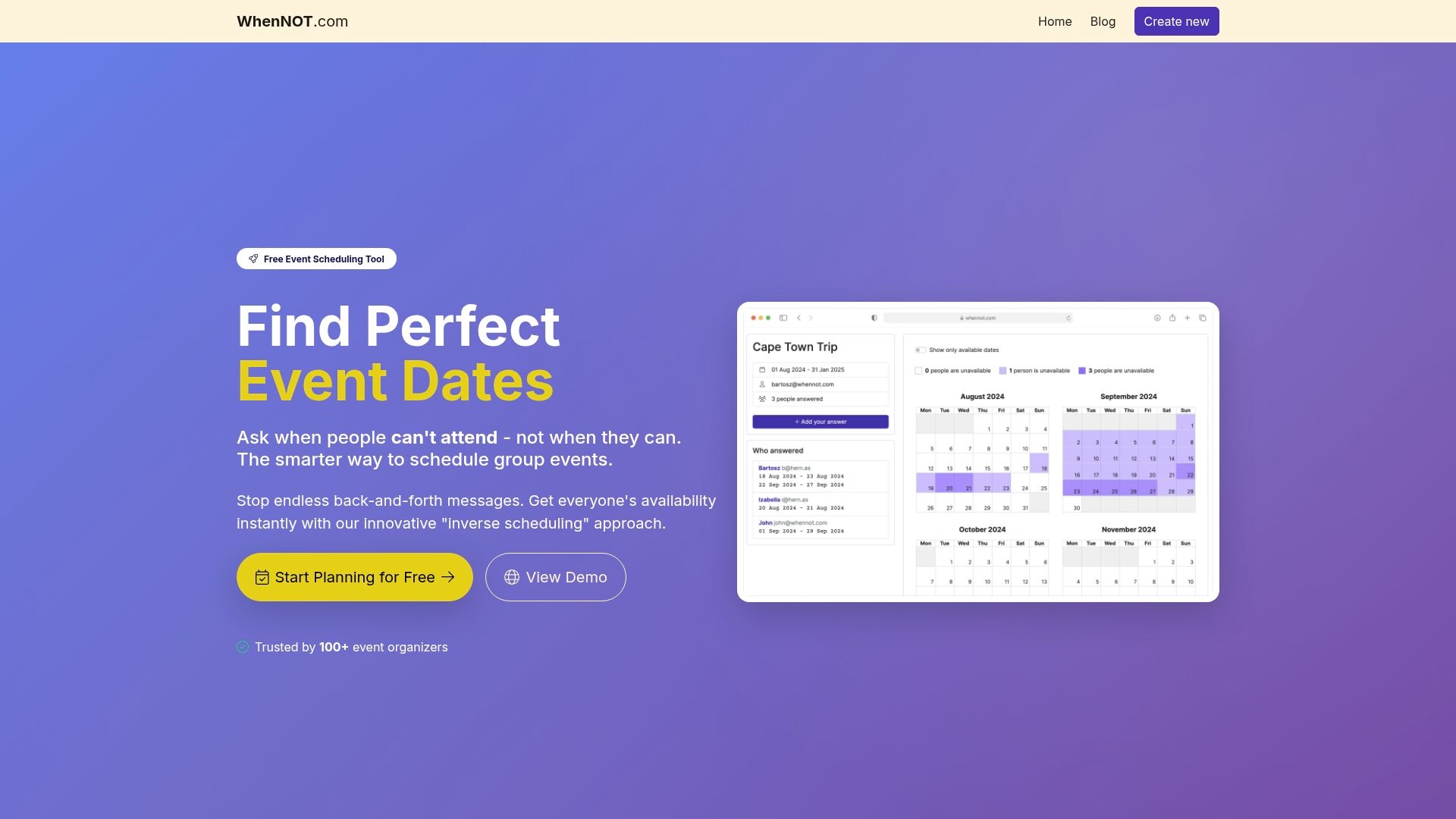
WhenNOT is designed specifically to overcome these challenges by using an innovative inverse scheduling method. Instead of asking when everyone is available, it collects when participants are not busy, making it easier to find the best retreat dates even for multi-day or flexible events. Its easy-to-use platform requires no accounts or sign-ups and provides a clear visual dashboard that prevents scheduling overlaps and simplifies communication. Whether you are an event director, logistics manager, or communication specialist, WhenNOT adapts to your needs, helping your team stay aligned effortlessly.
Take control of your retreat planning today and experience how technology can transform your timeline and reminders into a cohesive, stress-free process. Visit WhenNOT Scheduling Tool now and start scheduling smarter.
Frequently Asked Questions
How can I identify critical milestones for my retreat planning reminders?
To identify critical milestones, begin by outlining the main objectives of your retreat, such as team building or professional development. Create a timeline that includes essential tasks like budget allocation, venue selection, and participant communication, ensuring each milestone is clearly defined and actionable.
What types of reminders should I create for different team roles during retreat planning?
Create tailored reminders for each team role involved in the planning process. For example, a budget coordinator can receive alerts about payment deadlines, while a logistics manager should get reminders for venue confirmations and transportation schedules.
How do I automate schedule updates when changes occur during retreat planning?
To automate schedule updates, use digital tools that allow real-time synchronization of calendars across your team. Choose a platform that enables modifications to propagate automatically, eliminating manual updates and reducing potential errors in scheduling.
What visual tools can I use to track group availability for my retreat?
Utilize visual scheduling tools, such as color-coded calendars and interactive timelines, to represent group availability. These tools simplify the identification of optimal meeting windows and help prevent scheduling conflicts by providing clear visual insights at a glance.
How often should I send notifications to my team to avoid scheduling conflicts?
Send notifications regularly, adjusting the frequency based on the specific needs of each team member's role. Aim to provide timely alerts for key milestones and potential conflicts to keep everyone informed and engaged in the planning process.
How can I analyze response patterns to improve future retreats?
Analyze response patterns by collecting data on engagement rates, communication effectiveness, and timing preferences from previous events. Use this information to refine your strategies, focusing on what worked well and what needs enhancement for future retreats.